Virtual Shuffle - Truly Random4.1.46
Publisher Description
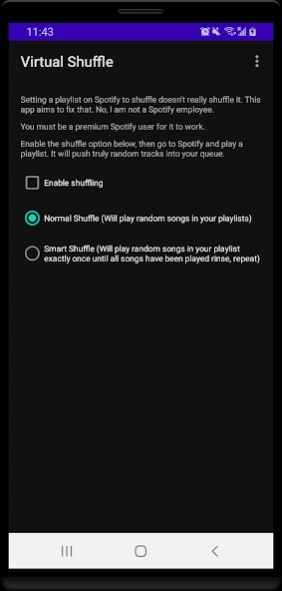


This Spotify shuffler ensures you hear truly random songs on Spotify
Have you noticed that Spotify does not play truly random songs in your playlists, liked songs, artists etc when shuffle is turned on?
Have you noticed that Spotify keeps playing the exact same series of songs every single time even though shuffle is on?
Have you noticed that enabling the shuffle feature on Spotify does not actually get your songs shuffled?
I noticed this too.
I scoured the internet for information on how to shuffle on Spotify but all I found were websites that would slowly create a new random playlist for me to listen to every time I wanted to listen to music on Spotify.
They weren't good enough. So, I decided to build my own Spotify shuffler and Virtual Shuffle – Truly Random came to life.
Virtual Shuffle – Truly Random takes control of Spotify and forces it to play truly random tracks in real-time. No more waiting for some new playlist to be created increasing clutter in your Spotify account.
To shuffle music on Spotify, simply open Virtual Shuffle – Truly Random, click the "Enable Shuffling" checkbox and give it authorization to access your Spotify account.
You will see a notification in your notification bar showing that Virtual Shuffle – Truly Random is running.
You can now close Virtual Shuffle – Truly Random, open Spotify and play songs from your playlists, liked songs, artists etc. Virtual Shuffle – Truly Random will push truly random tracks from your collections into your queue ensuring that you hear truly random tracks.
Virtual Shuffle – Truly Random will even start itself automatically if you restart your device. It's simply the best Spotify shuffler.
When you open Virtual Shuffle – Truly Random, you will see two options that will dictate how it will shuffle songs for you:
1. Normal Shuffle
2. Smart shuffle
Normal shuffle is well… normal. It’s completely random. It will randomly choose a track from your collection to play.
Smart shuffle on the other hand is random as well but it keeps track of the songs it has already played in any given collection so that it will not play them again until all songs in that collection have been played. This ensures that you will hear every song in any collection randomly but exactly once before it resets itself.
This track record persists even if you change the source of the music (Playlist/liked songs etc) or restart your device.
I personally prefer and use smart shuffle all the time.
If you notice a bug or want to request a new feature, you can contact me here: support@virock.org
Kindly note the following:
You must have a premium Spotify account for it to work.
Virtual Shuffle – Truly Random is a third party solution that is not affiliated with Spotify.
I am not a Spotify employee. I'm just a software developer who knows the value of a marvelous musical experience.
Virtual Shuffle – Truly Random has a 7 day trial period after which you'd have to pay $1.99 monthly or a one-time payment of $24.99 for a lifetime license to continue using it.
The following capabilities have been added to the app:
It can help to combine playlists.
It can help to delete multiple playlists at once.
It can create playlists based on your favorite
songs.
It can remove duplicate tracks from your playlists.
It can export playlists.
It can import playlists.
It can search through all playlists for a specific
song.
You can learn more about Virtual Shuffle – Truly Random here: https://shuffle.virock.org
Even more information can be found here: https://shuffle.virock.org/blog/how-to-shuffle-on-spotify
Leave the shuffling to Virtual Shuffle – Truly Random. It’ll give you a magical musical experience.
About Virtual Shuffle - Truly Random
The company that develops Virtual Shuffle - Truly Random is Victor Ahuwanya. The latest version released by its developer is 4.1.46. This app was rated by 1 users of our site and has an average rating of 3.0.
To install Virtual Shuffle - Truly Random on your Android device, just click the green Continue To App button above to start the installation process. The app is listed on our website since 2026-09-24 and was downloaded 24 times. We have already checked if the download link is safe, however for your own protection we recommend that you scan the downloaded app with your antivirus. Your antivirus may detect the Virtual Shuffle - Truly Random as malware as malware if the download link to org.virock.virtualshufflev2 is broken.
How to install Virtual Shuffle - Truly Random on your Android device:
- Click on the Continue To App button on our website. This will redirect you to Google Play.
- Once the Virtual Shuffle - Truly Random is shown in the Google Play listing of your Android device, you can start its download and installation. Tap on the Install button located below the search bar and to the right of the app icon.
- A pop-up window with the permissions required by Virtual Shuffle - Truly Random will be shown. Click on Accept to continue the process.
- Virtual Shuffle - Truly Random will be downloaded onto your device, displaying a progress. Once the download completes, the installation will start and you'll get a notification after the installation is finished.
Program Details
System requirements
Download information
Pricing
Version History
version 4.1.46
posted on 2026-09-24
Bug Fixes
version 4.1.42
posted on 2026-07-21
Updated Google billing library from 7.1.1 to 9.1.0 and altered code to account for breaking changes.
Updated targetSdk to from 35 to 37
version 4.1.37
posted on 2026-01-27
Fixed bugs that caused the app to crash when the user needs to re-authenticate themselves
version 4.1.33
posted on 2025-11-30
Fix bugs
version 4.1.13
posted on 2025-05-22
Fixed a bug that caused the Find Tracks module to fail if Spotify returns a 403 http status code.
Fixed a bug that caused the Get Track Information In Excel module fail if Spotify returns a 403 http status code.
Fixed a bug that caused the Import Playlists module to fail if the user has a bad internet connection.
version 4.1.12
posted on 2025-05-18
Fixed a bug that caused the Combine Playlists module to fail if Spotify returns a 403 http status code.
Added extra logs to find source of a bug.
Fixed a bug that caused the Export Playlist module fail if Spotify send a 500 class or 403 http code.
Fixed a bug that caused the Remove Duplicates module to fail if Spotify returns a 403 http status code.
version 4.1.11
posted on 2025-04-24
Added better logs to help identify a bug
version 4.1.10
posted on 2025-04-17
Fixed a bug that caused the Get Tracks Information module to fail if Spotify returns a 502 http status code.
version 4.1.9
posted on 2025-04-03
Fixed a bug that caused the Combine Playlists module to fail if Spotify returns a 404 http status code.
version 4.1.6
posted on 2025-03-13
Fixed a bug that caused the Import Playlist module to fail if Spotify returns a 502 HTTP status code
